Sage 50 Month-End Procedures: A Professional Checklist for IFRS Compliance
Professional Sage 50 month-end closing checklist for accountants. Learn to reconcile bank accounts, manage inventory, and ensure IFRS compliance for audit-ready reports.


Sage 50 Month-End Procedures: A Professional Checklist for IFRS Compliance
In the world of corporate accounting, the "Month-End Close" is the most critical period for financial accuracy. For businesses in the USA, Europe, and emerging markets like Ethiopia, performing a structured close in Sage 50 (Peachtree) ensures that your financial statements are audit-ready and comply with IFRS (International Financial Reporting Standards).
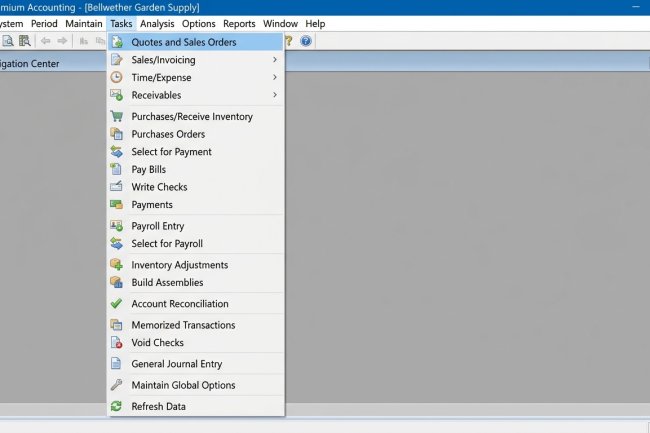
Expert Advice: Accuracy at year-end starts with a clean month-end. Before closing your month, make sure you have mastered the
Sage 50 Tasks Menu to ensure every daily transaction has been recorded correctly.
1. Finalizing the Revenue & Expenditure Cycle
The first step in a professional month-end close is ensuring all "Sub-ledgers" are updated.
-
Verify All Invoices: Ensure every sales order from the month has been converted into a Sales Invoice.
-
Post All Bills: Confirm that all vendor invoices received during the month are recorded in Accounts Payable to accurately reflect your monthly expenses and liabilities.
2. The Gold Standard: Bank Reconciliation
Discrepancies between your bank statement and your Sage 50 records can lead to major audit red flags.
-
Use the Account Reconciliation feature in the Tasks menu to match every check, deposit, and wire transfer.
-
Adjustment Tip: Record bank service charges and interest earned via a General Journal entry before finalizing the reconciliation.
3. Inventory Valuation & COGS Review
For manufacturing and retail firms, your Cost of Goods Sold (COGS) must match your physical stock.
-
Perform a month-end physical count.
-
Use the Inventory Adjustments module to reconcile your digital records in Sage 50 with your physical warehouse levels. This ensures your Gross Profit is reported accurately on your Income Statement.
4. Reviewing Aging Reports
A healthy balance sheet requires active management of receivables and payables.
-
Accounts Receivable (AR) Aging: Identify overdue customers and send reminders.
-
Accounts Payable (AP) Aging: Review upcoming due dates to manage your cash flow for the following month.
5. Generating and Locking Financial Statements
Once all reconciliations are complete, generate your Trial Balance, Balance Sheet, and Income Statement (P&L).
-
Pro-Tip: Once the reports are verified, go to
System > Change Accounting Periodto move into the next month. This "locks" the previous month, protecting your data from accidental changes and maintaining a clean audit trail.