How to Rename a Company in Peachtree (Sage 50 Accounting)
Learn step-by-step how to rename your company in Peachtree (Sage 50 Accounting) without losing data. Update company info safely in just minutes.

If you’re using Peachtree (now known as Sage 50 Accounting), you may need to change your company name due to rebranding, corrections, or updates in your business records. Many users think they must create a new company file, but the process is much easier — you can simply update the company information inside Peachtree.
In this guide, I’ll walk you through step-by-step instructions to rename your company in Sage 50 / Peachtree without affecting your accounting data.
Steps to Rename a Company in Peachtree (Sage 50)
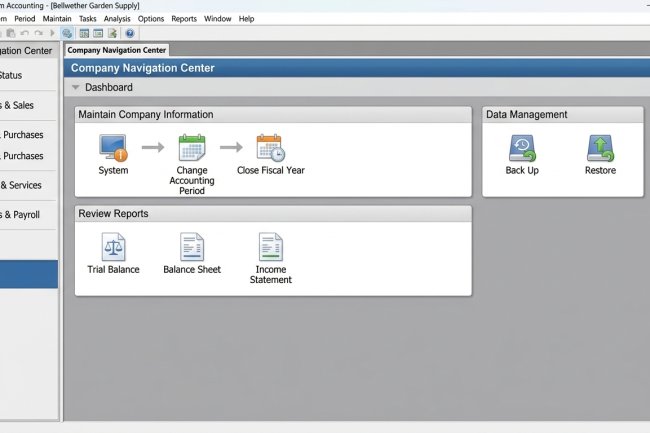
1. Open Sage 50 (Peachtree)
Launch the software and log in to the company file you want to rename.
2. Navigate to Company Information
On the top menu bar, go to:
Maintain → Company Information
3. Edit the Company Name
In the Company Information window, you’ll see fields such as:
-
Company Name
-
Address
-
Phone, Fax, Email
Update the Company Name field with your new business name.
4. Save the Changes
Click OK (or Save) to apply the changes.
5. Reopen the Company
Close the company and reopen it. You’ll now see the updated company name on the Select a Company window.
Important Notes Before Renaming
-
✅ Safe for data – Changing the company name does not affect your transactions, balances, or reports.
-
⚠️ Company folder name – If you also want to change the folder name where your company data is stored:
-
Close Sage 50 first.
-
Navigate to your company directory (default:
C:\Sage\Peachtree\Company). -
Rename the folder to match your new company name.
-
Reopen Sage 50 and select the company again.
-
Be cautious when renaming folders, as incorrect changes may cause Peachtree not to locate your data file.
Final Thoughts
Renaming a company in Sage 50 (Peachtree Accounting) is a quick process that only requires updating the company information. There’s no need to create a new file or lose your history — all your transactions, reports, and financial data remain intact.